IntroductionIMPORTANT UPDATE: The official HB Media website is currently offline, and its future is uncertain. In the meantime, you can check out our Best IPTV Services page for alternative options.Information about HB Media IPTVThis detailed review provides comprehensive information about HB Media
HB Media IPTV: More Than 10,000 Channels at $21 Per Month

Contents
Introduction
IMPORTANT UPDATE: The official HB Media website is currently offline, and its future is uncertain. In the meantime, you can check out our Best IPTV Services page for alternative options.

Information about HB Media IPTV
This detailed review provides comprehensive information about HB Media IPTV, including its channel offerings, pricing details, installation process, registration requirements, and much more.
HB Media IPTV is a popular IPTV service that boasts an impressive catalog of over 10,000 channels, many of which are available in high-definition (HD) quality. Users have access to a wide variety of channels spanning multiple categories, such as international, sports, pay-per-view (PPV), entertainment, news, and more.
Pricing
The standard package offered by HB Media IPTV is priced at $21.00 per month. This package includes access to all the available channels, video-on-demand (VOD) options, and three simultaneous connections. However, during the registration process, users have the option to add more connections if desired.
Devices and Compatibility
HB Media IPTV can be easily installed on any Android-powered device, including popular streaming devices like Amazon Firestick, Fire TV, Fire TV Cube, and NVIDIA Shield. Moreover, it is compatible with a range of IPTV Players, such as IPTV Smarters, TiviMate, and Perfect Player, allowing users to personalize their viewing experience.

VPN Recommendation
Given the nature of unverified IPTV services, it is highly recommended to use a virtual private network (VPN) to ensure privacy and security. HB Media IPTV suggests using a VPN to safeguard your online activities. For further information and guidance on selecting the best VPN for IPTV, refer to our dedicated article on the topic.

HB Media IPTV Highlights
- Over 10,000 channels to choose from, catering to diverse interests and preferences.
- Pricing plans start at $21.00/month, providing access to a vast range of channels and features.
- Multiple subscription options available to suit different durations and requirements.
- Standard package allows for three simultaneous connections, with the flexibility to add more during registration.
- HB Media IPTV is VPN-friendly and not IP location locked, ensuring greater accessibility and privacy.
- Extensive selection of video-on-demand (VOD) options for on-demand entertainment.
- Offers pay-per-view (PPV) events and major sports channels for sports enthusiasts.
- Includes a wide range of international channels, catering to viewers from various countries.
- FileLinked store facilitates easy installation and access to additional content.
- M3U URL support for seamless compatibility with popular IPTV Players.
- Electronic Program Guide (EPG) allows for easy navigation and browsing.
- Accepts various payment methods, including Cashapp, Zelle, Venmo, Square, Google Pay, and Amazon Pay.
- Compatible with Firestick/Fire TV and other Android devices, ensuring widespread compatibility.
- Accessible customer support through an online contact form and email.
- Favorites manager feature allows users to easily organize and access their preferred channels.
- External player support enables integration with external video players for a personalized viewing experience.


HB Media IPTV Channels
As previously mentioned, HB Media IPTV offers an extensive collection of channels. With over 10,000 live channels available, users can access a wide range of content across various categories. These categories include news, entertainment, sports, international channels, and much more, ensuring there is something for everyone.
Screenshots
Screenshots of HB Media IPTV’s user interface and available channels can be found on our website. These screenshots provide a visual representation of the service’s interface and the diverse range of content it offers.
Pricing Options
HB Media IPTV offers several subscription plans to suit different preferences and needs. These plans vary based on the duration of the subscription and the included features. At the time of writing, the popular subscription options offered by HB Media IPTV are as follows:
- $21.00/month for over 10,000 channels, VOD content, and three connections.
- $55.00 for a three-month subscription, providing access to over 10,000 channels, VOD content, and three connections.
- $65.00 for a six-month subscription, granting access to over 10,000 channels, VOD content, and three connections.
- $126.00 for a twelve-month subscription, offering access to over 10,000 channels, VOD content, and three connections.
Note: As a general recommendation, it is advisable to opt for a month-to-month payment plan with any IPTV service to avoid being locked into long-term commitments in case the service goes offline.
How to Register for HB Media IPTV
Before using the HB Media IPTV service, users are required to register for an account on the official website of HB Media IPTV. Registration ensures a smoother user experience and provides access to the service’s extensive channel lineup.
Please note: Ensure that you check the email address used for registration, as it will receive a confirmation email containing essential account login information, installation instructions, and other pertinent details regarding the service.
Step-by-Step Installation Guide

To install HB Media IPTV on your preferred streaming device, follow these steps:
<!– –>
–>
How to Install HB Media IPTV
HB Media IPTV can be easily installed on various popular streaming devices. The supported devices include:
- Amazon Firestick
- Fire TV
- NVIDIA Shield
- Android TV Boxes
- Chromecast
- Android phones and tablets
- Other devices running the Android operating system
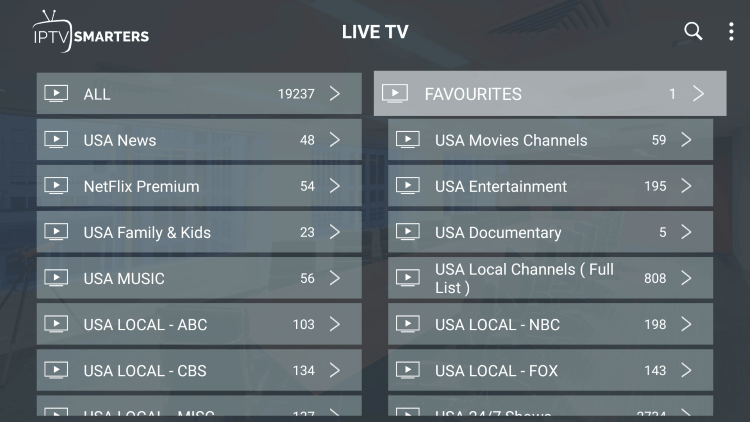
Users have two installation options: using an IPTV Player or opting for the stand-alone application. For installation with an IPTV Player, the service provides an M3U URL that can be used with players like IPTV Smarters, TiviMate, Perfect Player, and more. However, the stand-alone application can also be installed directly.
Adding Channels to Favorites
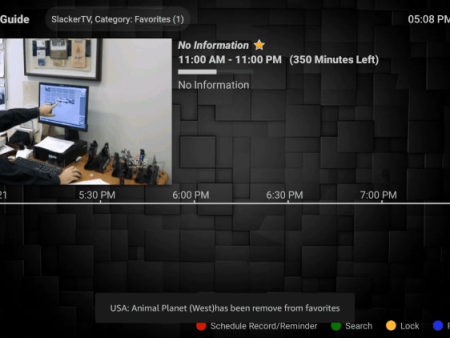
One of the standout features of HB Media IPTV is the ability to add channels to a favorites list for easy access. This feature is particularly useful for users who have specific channels they frequently watch. Follow these steps to add channels to your favorites:

<!– –>
–>

Adding an External Video Player
HB Media IPTV also allows users to integrate external video players to enhance their viewing experience. To add an external player, follow these steps:

<!– –>
–>
Additional IPTV Options
For users seeking more IPTV options, our website offers popular IPTV service reviews. These reviews provide comprehensive insights, allowing users to explore and select the best IPTV services based on their preferences and requirements.


Conclusion
In conclusion, HB Media IPTV is a robust and feature-rich live TV service that offers an extensive range of high-definition channels across various categories. With competitive pricing plans, versatility, and compatibility with popular streaming devices, HB Media IPTV provides an enjoyable and customizable viewing experience for users.


FAQs
What is HB Media IPTV?
HB Media IPTV is an IPTV service that offers access to a vast catalog of live channels at an affordable price.
What channels does HB Media IPTV have?
HB Media IPTV provides over 10,000 channels across different categories, including news, entertainment, sports, international channels, and much more.
How much does HB Media IPTV cost?
HB Media IPTV offers various subscription plans, starting at $21.00 per month for the standard package, which includes over 10,000 channels, video-on-demand content, and three connections.
What devices can HB Media IPTV be installed on?
HB Media IPTV is compatible with any device running the Android operating system, including Amazon Firestick, Fire TV, and various Android devices. This ensures widespread accessibility and ease of installation for users.


Recent News