IntroductionBing TV is a popular IPTV service that offers a wide range of live channels and VOD options. In this detailed review, we will explore Bing TV’s features, pricing, installation process, registration, and more.Features of Bing TV Bing TV provides users access to over 4,000 live channels,
Bing TV IPTV: Experience 4,000+ Live Channels at $15/Month

Contents
- 1 Introduction
- 2 Features of Bing TV
- 3 What is IPTV?
- 4 Importance of Using a VPN with Unverified IPTV Services
- 5 Bing TV Highlights
- 6 Bing TV Official Website
- 7 Legal Disclaimer
- 8 Screenshots
- 9 Bing TV Channels
- 10 Pricing
- 11 How to Register for Bing TV
- 12 How to Install Bing TV
- 13 Adding Channels to Favorites
- 14 How to Add External Video Player
- 15 Legal Status of Bing TV IPTV
- 16 Bing TV FAQ
Introduction
Bing TV is a popular IPTV service that offers a wide range of live channels and VOD options. In this detailed review, we will explore Bing TV’s features, pricing, installation process, registration, and more.

Features of Bing TV
- Bing TV provides users access to over 4,000 live channels, making it a comprehensive IPTV service.
- Users can enjoy various channel categories, including international, sports, PPV (Pay-Per-View), entertainment, news, and more.
- The service also offers a 24-hour free trial, allowing users to explore its features before committing to a subscription.
- With the standard subscription plan priced at $15.00/month, users can take advantage of the vast channel options available.
- While the standard plan includes one connection, users can request additional connections during the registration process.
- Compatibility is not an issue as Bing TV can be installed on any Android-powered device, including Amazon Firestick, Fire TV, Fire TV Cube, NVIDIA Shield, and more.
What is IPTV?
IPTV stands for “Internet protocol television,” which refers to the delivery of live television content through the internet. It allows users to stream TV channels and other multimedia content over an internet connection.

Importance of Using a VPN with Unverified IPTV Services
For enhanced online security and privacy, it is highly recommended to use a VPN (Virtual Private Network) when accessing unverified IPTV services. A VPN encrypts your internet traffic and protects your identity, preventing potential threats and ensuring a safe streaming experience. Be sure to check out the best VPN options for IPTV services to safeguard your online activities.
Bing TV Highlights
Bing TV offers a plethora of exceptional features and benefits:
- Access to over 4,000 live channels, catering to various interests and preferences.
- Different subscription plans starting at $15.00/month.
- A wide range of VOD (Video on Demand) options for on-demand viewing.
- A 24-hour free trial that allows users to experience the service.
- VPN friendly, ensuring privacy and security while using the service.
- Increase the number of connections based on individual preferences.
- Availability of major news channels, PPV events, adult packages, and sports channels.
- International channels for users with diverse language and cultural preferences.
- M3U URL support for seamless integration with various IPTV players.
- Electronic Program Guide (EPG) for convenient channel browsing.
- Favorites manager to personalize channel selection.
- External player support for a customizable streaming experience.
- Compatibility with popular IPTV players, ensuring flexibility.
- Not IP location locked, allowing users to access the service from anywhere.
- Accepted payment methods include PayPal and Credit/Debit cards.
- Responsive customer support through online contact forms, email, and social media.


Bing TV Official Website
Due to the uncertain legal status of Bing TV, its official website is not shared in this review. It is essential to be cautious when dealing with unverified IPTV services and ensure compliance with legal requirements.
Legal Disclaimer
IPTV WIRE, the author of this review, does not own or operate any IPTV service or streaming application. We do not endorse or distribute any applications or verify the licensing of IPTV services or app developers. Users are solely responsible for their media access through any device, app, addon, or service mentioned on our website.

For those seeking fully legal IPTV services, VIDGO is recommended as a reliable alternative.
Screenshots
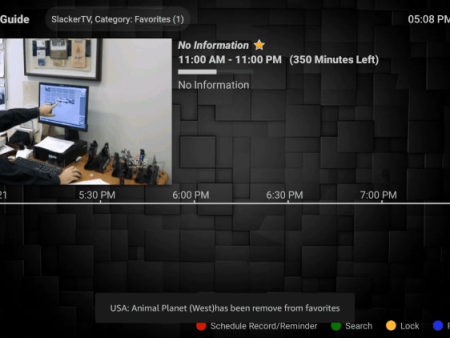
Below are some screenshots illustrating the user interface and features of Bing TV:
[Insert screenshots here]Bing TV Channels
Bing TV offers a wide selection of channels to cater to different interests:
- Over 4,000 live channels, ensuring a diverse range of content options.
- Channels are categorized into news, entertainment, sports, international, and more.
- Additional options such as PPV events, major sports channels, adult packages, and exclusive content sets Bing TV apart from other services.
Whether users prefer mainstream channels or niche content, Bing TV provides a comprehensive range of choices.
Pricing
Bing TV offers different subscription plans to accommodate users’ preferences and needs:
- $15.00/month for access to over 4,000 channels, VOD options, and one connection.
- $20.00/month for access to over 4,000 channels, VOD options, and two connections.
- $25.00/month for access to over 4,000 channels, VOD options, and three connections.
- $30.00/month for access to over 4,000 channels, VOD options, and four connections.
- $35.00/month for access to over 4,000 channels, VOD options, and five connections.

Note: It is recommended to opt for a month-to-month payment plan to avoid potential disruption in case of service downtime.
How to Register for Bing TV
Before using Bing TV’s IPTV service, users need to complete the registration process on the official website. The following steps outline the registration process:
- Visit Bing TV’s official website.
- Locate the registration section and fill in the necessary details.
- Submit the registration form.
- Check the email address used during registration for a confirmation email.
- Open the confirmation email to access account login information, installation instructions, and other important details.

It is crucial to check the confirmation email to gain access to Bing TV’s services.
How to Install Bing TV
Bing TV can be easily installed on various streaming devices to enjoy its wide range of channels and features:
- Install Bing TV on devices such as Amazon Firestick, Fire TV, NVIDIA Shield, Android TV Boxes, and more.
- Utilize IPTV players like IPTV Smarters, Perfect Player, Tivimate, or others using Bing TV’s M3U URL.
- Alternatively, install the stand-alone Bing TV application by following these steps:
- Install the Downloader app on the desired device.
- Access the Downloader app and enter the appropriate URL to download the Bing TV application.
- Follow the on-screen prompts to complete the installation process.

By following these steps, users can easily enjoy Bing TV’s extensive content library on their preferred devices.
Adding Channels to Favorites
Bing TV offers a convenient feature that allows users to add channels to their Favorites section for quick and easy access. The following steps explain how to add channels to Favorites:

- Find the desired channel on Bing TV’s interface.
- Press and hold the OK button to trigger the channel options.
- Select “Add to Favorites” to mark the channel as a favorite.
- Return to the channel category list and navigate to the “Favorites” section to access the selected channels.
- To remove a channel from Favorites, hover over the channel, hold down the OK button, and select “Remove from Favorites.”


By using the Favorites feature, users can easily customize their channel lineup and access their preferred content with ease.

How to Add External Video Player
Bing TV supports the integration of external video players, providing users with the flexibility to personalize their streaming experience. Follow these steps to add an external video player to Bing TV:
- Access Bing TV’s settings from the home screen.
- Select “External Players.”
- Choose the desired media player (e.g., MX Player).
- Select “Add Player” and follow the on-screen prompts to complete the integration process.


With an external video player integrated, users can enjoy their preferred media player while using Bing TV.

Legal Status of Bing TV IPTV
Given the uncertain legal status of Bing TV, it is essential for users to exercise caution and ensure compliance with legal requirements. IPTV WIRE does not endorse or verify the licensing of IPTV services or applications. Users are accountable for their media access through any device, app, addon, or service mentioned in this review.


For users seeking fully legal IPTV services, it is highly recommended to explore alternative options such as VIDGO.
Bing TV FAQ
What is Bing TV?
Bing TV is an IPTV service that offers a wide range of live channels at an affordable price, providing users with a diverse selection of content.
What Channels does Bing TV have?
Bing TV provides access to over 4,000 live channels within multiple categories. Users can enjoy channels related to news, entertainment, sports, international content, and more.
How much does Bing TV cost?
Bing TV offers different subscription plans with pricing options starting at $15.00/month. The cost may vary based on the selected plan’s duration and content offerings.
What devices can this IPTV service be installed on?
Bing TV is compatible with any device running the Android operating system. This includes popular devices like Amazon Firestick, Fire TV, Android TV Boxes, NVIDIA Shield, Chromecast, Android phones, tablets, and more.
With Bing TV, users can enjoy an extensive collection of live channels and on-demand content at their convenience. The service’s versatility and affordable pricing make it an attractive choice for IPTV enthusiasts.


Recent News